
Do It Once. Apply It to Everything.
Rate, tag, label, file and export a whole selection in a single pass — and grade hundreds of photos with one .cube LUT, with a live intensity slider before you commit to anything.
- 5Bulk actions in one panel
- Any.cube LUT — imported, or saved from the editor
- SecondsTo tag 1,000 photos, not minutes
- 0Uploads — every pass runs on your machine
Rate, tag and label a whole selection
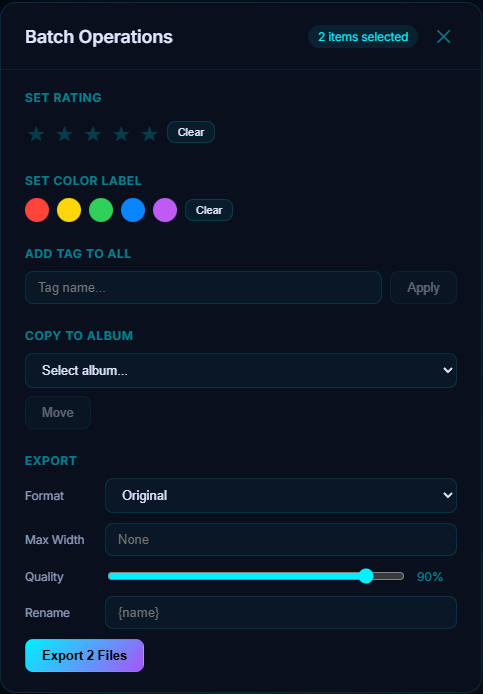
Set a star rating, apply one of five color labels, add a tag, and drop the lot into an album — without reopening the panel between actions.
One look across a whole shoot
Pick any .cube LUT and it grades every selected photo at once — the same LUT library the editor uses, so a look you built on one frame applies to a hundred.
See the grade before you commit
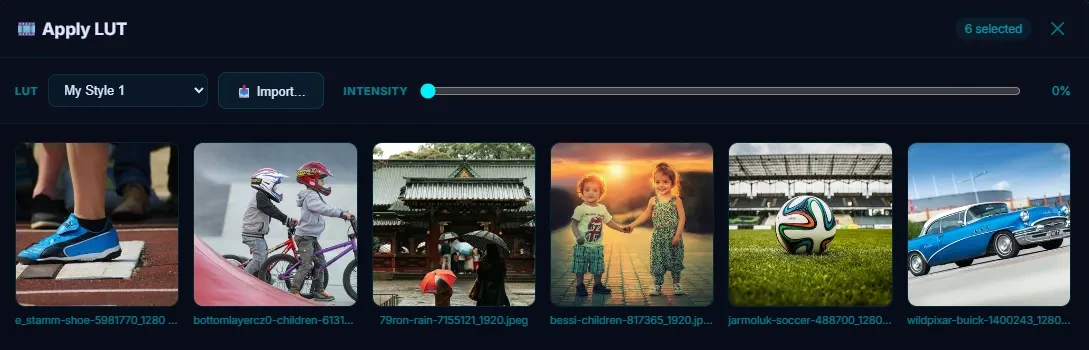
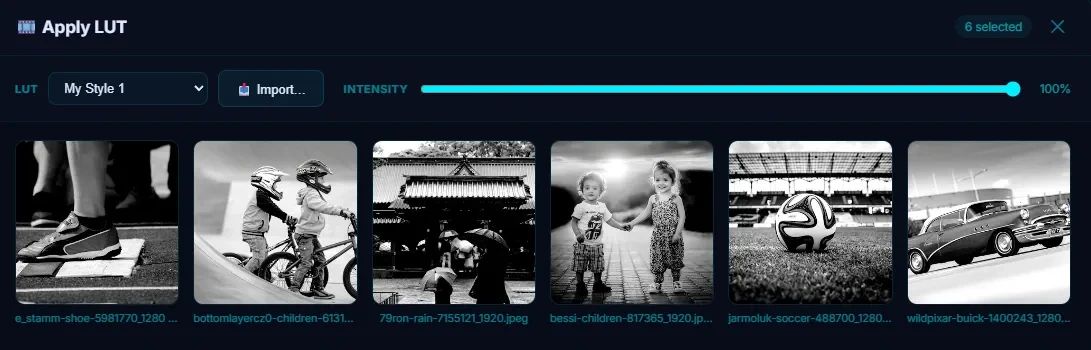
Every selected photo previews live as you drag the intensity slider, and clicking any tile renders that photo at full resolution.
Copies or in place — your call
Save graded copies beside the originals, or overwrite the originals after an explicit confirmation. Nothing is decided for you.
Export a batch, your way
Convert format, cap the width, set quality, and rename with a pattern — videos in the selection are copied through untouched.
Built for thousands, not dozens
Ratings, labels, tags and album moves are written in one database transaction, so a 1,000-photo pass finishes in seconds.
Select Anything, Then Act on All of It
Select photos in the grid the way you would anywhere else — click, shift-click a run, ctrl-click to add — and the sidebar grows two buttons: Batch Operations and Apply LUT, each showing how many photos it is about to touch.
The batch panel holds five actions:
- Set rating — one to five stars across the selection, or clear it
- Set color label — red, yellow, green, blue or purple, or clear it
- Add tag to all — type a tag and it is attached to every selected photo
- Copy to album — drop the whole selection into any album, in any library
- Export — a full export dialog for the selection (below)
Each one applies the moment you click it and marks itself with a green check, so you can stack several on the same selection — three stars, a green label, a "portfolio" tag and an album — without closing the panel and reselecting.
One Look, Hundreds of Photos
Select any number of images, open Apply LUT, and pick an industry-standard .cube file. It is the same LUT library the image editor uses, and it fills two ways: import a .cube you bought or downloaded, or build a grade on a single photo in the editor and hit Save as LUT — Pluto bakes your curves, HSL, split toning and color sliders into a 33³ cube you can then apply to everything else.
Every selected photo renders as a live preview. Drag the intensity slider and the whole grid re-grades, so you can dial a look from a whisper to full strength before anything is written — and clicking any tile renders that photo at full resolution with the grade applied, because a thumbnail is not enough to judge skin tones on.
Then choose how it lands:
- Save as Copies — writes a graded copy beside each original (
photo_lut.jpg) and registers it in your library, inheriting the original's date so it sorts where you expect - Save & Override — replaces the originals in place, behind an explicit confirmation, and regenerates their thumbnails straight away
RAW, HEIC and TIFF files grade fine and come out as JPEG copies; overwriting in place is offered only for JPEG, PNG and WebP originals, where the same format can be written back. Videos and PDFs in the selection are skipped, and the footer tells you how many before you start.
Export the Selection, Your Way
Point the export at a folder and it writes the whole selection there:
- Format — keep the original, or convert to JPEG, PNG or WebP
- Max width — cap the width with the aspect ratio preserved, and never upscale a photo that is already smaller
- Quality — a compression slider for the JPEG and WebP paths
- Rename — a pattern built from
{name}(the original filename) and{n}(a zero-padded sequence number), soHawaii-{n}becomesHawaii-0001.jpg
Videos in the selection are copied through untouched rather than quietly re-encoded, EXIF orientation is baked in on the way out so nothing lands sideways, and an existing file is never overwritten — a name clash gets a counter instead.
Built for Thousands, Not Dozens
Ratings, color labels, tags and album moves are written to the library database in one transaction per action, not one write per photo — which is why tagging a thousand photos takes seconds rather than minutes.
LUT grading is real pixel work, so it runs with a progress bar and takes as long as decoding and re-encoding your photos takes. It still happens entirely on your machine: no upload, no queue, no per-image credits, and no connection required.
Try Batch Operations in Pluto Photos
Download free for Windows, macOS, or Linux. Batch Operations is available in the Pro tier.