
Import from Google Photos, iCloud & More.
Migrate your entire photo library from cloud services in one import. Pluto Photos reads the metadata Google Photos Takeout and iCloud leave behind, so dates, GPS, and captions come with your photos instead of getting left in the export.
- 4Supported sources — Takeout, iCloud, Immich, any folder
- 7Metadata fields preserved on import
- AutoDuplicate detection skips re-importing
- 0Photos uploaded anywhere — it stays a local copy
Dates and GPS survive the move
Metadata files are read for every photo, so your timeline and map view are correct immediately after import — not just approximately right.
Albums become tags
Google Photos album structure is converted to tags, so you keep your organization without needing folders for it.
Handles Google's naming quirks automatically
Truncated filenames, mismatched sidecar names, and edited-copy variants are all matched correctly — no manual renaming.
No duplicate re-imports
Already have some of these photos? Duplicate detection skips them instead of doubling your library.
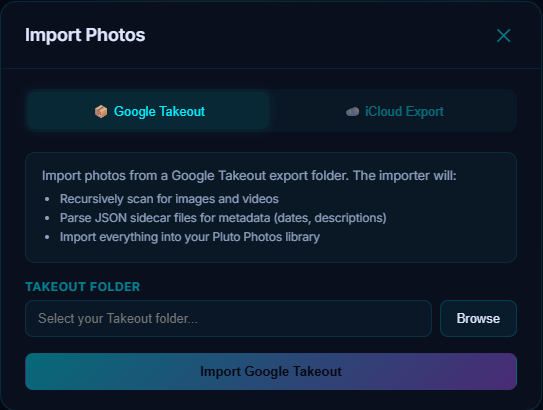
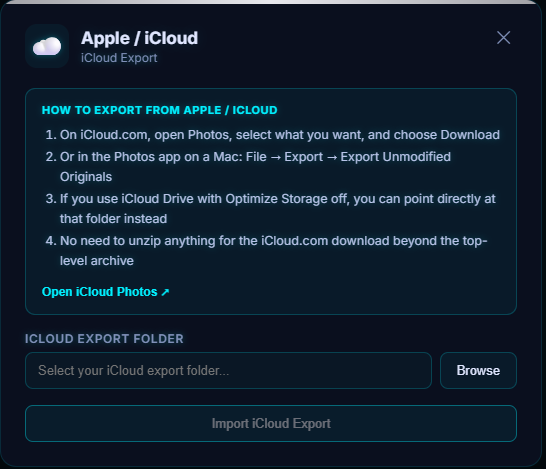
When you export a library from Google Photos or iCloud, your photos come out — but the details that make them findable (the date they were actually taken, where they were taken, which album they were in) get left behind in separate metadata files most photo apps never look at. Cloud Import reads those files and reattaches everything before your photos ever land in your library.
What you can import
- Google Photos Takeout — reads the
.jsonsidecar Google writes next to every photo, in all six of the naming forms Google actually uses (including truncated filenames and edited-copy variants), to recover the real date and GPS. - iCloud Photos export — preserves the date and location metadata already embedded in the files.
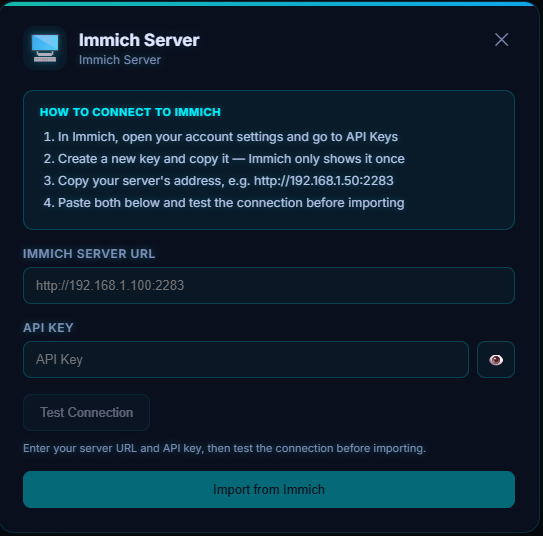
- Immich server — connects directly to a running Immich instance by server URL and API key, no export step first.
- Any plain folder of photos — no export format required; point it at any folder and it imports what it finds.
What gets preserved on import
| Metadata | Preserved? |
|---|---|
| Date and time | Yes |
| GPS coordinates | Yes |
| Album names | Yes — converted to tags |
| Descriptions/captions | Yes |
| Favorites | Yes — converted to star ratings |
| People tags | Yes |
| Edited versions | Yes — both the original and the edit are kept |
How the import works, step by step
- In Pluto Photos, open Cloud Import from the toolbar and choose the tab for your source.
- Takeout or iCloud: export your library, extract everything into one folder, and point the importer at it. Immich: enter your server's URL and an API key from your Immich account settings, then test the connection.
- Start the import.
- The importer reads each photo's metadata, writes the correct date and GPS into your library, and converts album names into tags.
- Duplicate detection runs automatically, so photos already in your library — a common overlap if you've imported before — aren't added a second time.
Everything happens on your machine. Nothing is uploaded anywhere during the process — the "cloud" in Cloud Import refers to where your photos are coming from, not where they're going.
Try Cloud Import in Pluto Photos
Download free for Windows, macOS, or Linux. Cloud Import is available in the Pro tier.