
Find and Remove Duplicate Photos.
Scan your library for exact and near-duplicate photos using perceptual hashing. Reclaim gigabytes of wasted disk space with one click.
- 5–15%Typical duplicates in a large library
- PerceptualHashing — catches resizes & re-encodes
- 1 clickKeep-largest / keep-oldest auto-select
- GBsOf disk space reclaimed on a real library
Goes beyond filenames
Perceptual hashing compares the actual pixels, so a renamed copy or a re-exported JPEG is still caught.
Catches near-duplicates too
Burst shots and slightly cropped versions of the same photo are grouped, not just byte-identical files.
Review before you delete
Every group shows size, dimensions, and both dates side by side — nothing is removed without a look first.
Metadata-aware
Star ratings and tags are shown per copy, so cleanup never silently drops the one with your notes on it.
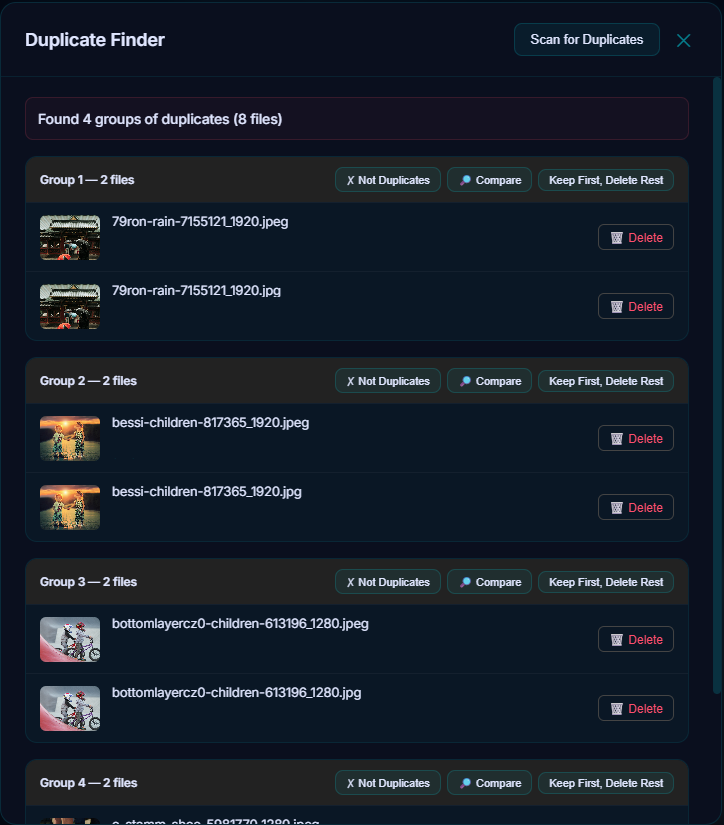
Over time, photo libraries accumulate duplicates — from backups, imports, cloud downloads, and shared folders. Pluto Photos' Duplicate Finder uses advanced perceptual hashing to find them all.
Beyond Filename Matching
Most duplicate finders only compare filenames or file sizes. Pluto Photos goes further with perceptual hashing — a technique that compares the visual content of images. This catches:
- Exact duplicates — Identical files with different names
- Re-encoded copies — Same photo saved at different JPEG quality levels
- Resized copies — Same photo at different resolutions
- Near-duplicates — Burst shots, slightly cropped versions
How It Works
- Scan — Pluto Photos generates a perceptual hash for each image in your library
- Compare — Hashes are compared to find groups of similar images
- Review — Duplicate groups are shown side-by-side with file details (size, dimensions, date)
- Clean up — Select which copies to keep and delete the rest
Smart Decisions
For each duplicate group, Pluto Photos shows:
- File size and dimensions (keep the larger/higher-quality version)
- Date taken and date modified
- File path (see which folder each copy is in)
- Star rating and tags (don't lose metadata)
How Much Space Can You Save?
Users with large libraries (10,000+ photos) typically find 5–15% duplicates. On a 100 GB library, that's 5–15 GB of wasted space recovered.
Batch Operations
Don't want to review every duplicate manually? Use auto-select rules:
- Keep the largest file in each group
- Keep the oldest file
- Keep the file with the highest rating
Try Duplicate Finder in Pluto Photos
Download free for Windows, macOS, or Linux. Duplicate Finder is available in the Pro tier.