
A Premiere Pro Alternative for the Videos You Actually Make.
A real timeline with transitions, LUT color grading, green screen, watermarks and music tracks, sitting inside the app that already holds your clips. $29 once, and it runs offline.
Premiere Pro is built for people cutting films and television, and it is priced like it, every month, forever.
Most of us are not doing that. We are pulling the good four minutes out of a forty minute holiday video, cutting six phone clips together, warming up the color so they stop looking like phone clips, dropping in some music and a title, and exporting once. Paying a subscription for the rest of your life to do that is a lot.
What the editor does
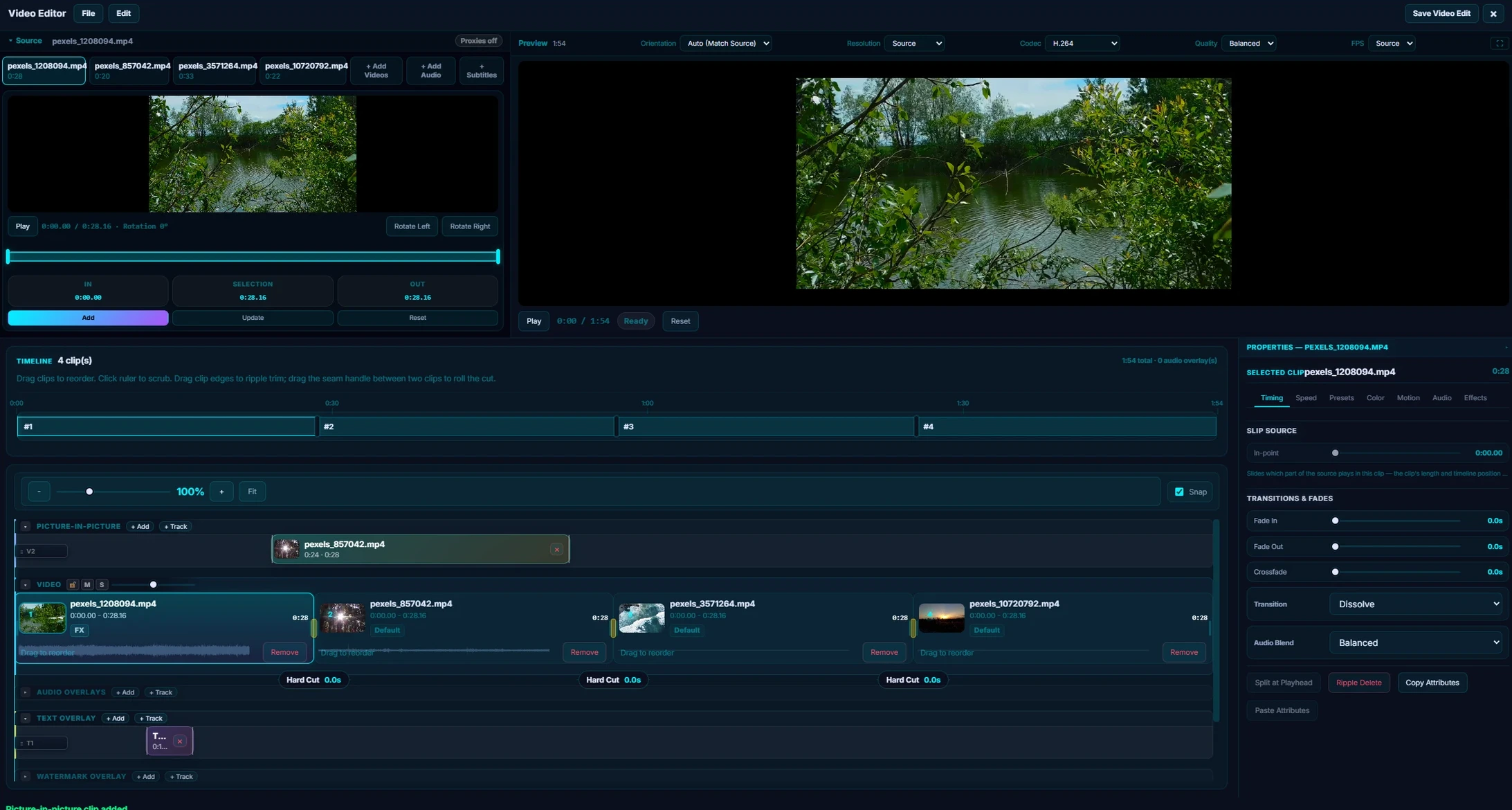
One window: source and preview monitors up top, colour-coded timeline lanes below, and every clip property on the right.
You get a real timeline. Add clips, drag them into the order you want, split at the playhead, and set separate in and out points for each one, so the same file can turn up three times in three different places. Crossfade or dip to black between clips, with handles you drag to set how long the transition lasts, plus a fade in and out on any clip.
Effects stack up per clip: letterbox bars, vignette, film grain, blur, and LUT color grading with six looks built in and support for your own .cube files. Green screen works with an eyedropper and a tolerance slider, and you watch the background disappear in the preview as you drag it. If you want a head start, three presets called Trailer Look, Dreamy and Retro Film give you something to work from and pull apart.
Watermarks, text or image, are placed by dragging them where you want them, with control over font, color, shadow, outline, opacity, and which part of the clip they show up on.
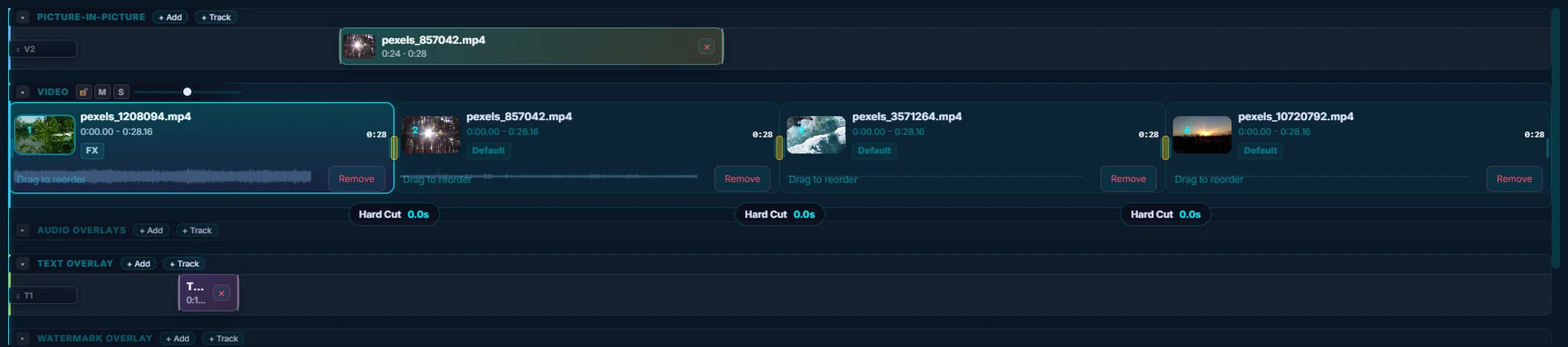
Every kind of thing you can stack gets its own lane, colour-coded and named. Lanes you are not using fold away to a single bar.
Audio stacks too. Music, a voiceover, a sound effect, each with its own trim, volume and crossfade, and ducking so the music drops under the talking by itself.
There are three repair presets for the things that actually ruin home footage: Clean Dialogue for muddy audio, Low Light Rescue for clips shot too dark, and Mobile Cleanup for shaky phone video.
Exports come out at the resolution you shot at, with no watermark. The only watermark on your video is one you put there.
Multicam is here too. Drop in up to sixteen angles, let it line them up for you off their own audio, then cut between them live while the timeline plays. Group a run of clips into a nested sequence and it collapses to a single block you can trim and move as one, four levels deep if you need it, and the titles, music and effects sitting over it come along. And every animated property has a real curve editor: drag the keyframes, drag the handles, and shape the easing instead of picking from a list.
The clips are already in there
Your video sits in the same app as your photos, so there is no exporting out of one program and importing into another before you can start. And like the rest of the app, it runs on your own machine with no account and no connection.
Adobe Premiere Pro vs Pluto Photos
| Adobe Premiere Pro | Pluto Photos | |
|---|---|---|
| Price | Every month, forever | $29 once |
| If you stop paying | Locked to a restricted view-only mode | Nothing changes, it stays yours |
| Works with no internet | Has to check in with Adobe now and then | Always, there is nothing to check in with |
| Watermark on your export | No | No |
| Timeline with several clips | Yes | Yes |
| Transitions and fades | A huge selection | Crossfade, dip to black, and per-clip fades |
| LUT color grading | Yes | Yes, 6 built in plus your own .cube files |
| Green screen | Yes | Yes, with a live preview as you adjust it |
| Music and voiceover with ducking | Yes | Yes |
| Text and image watermarks | Yes | Yes |
| Shaky footage | Warp Stabilizer | Stabilize and jello repair presets |
| Multicam editing | Yes | Yes, up to 16 angles with automatic audio sync |
| Nested sequences | Yes | Yes, up to 4 levels deep |
| Proxy workflow for large files | Yes | Yes |
| Photo library included | No | Yes |
| Runs on | Windows, macOS | Windows, macOS, Linux |
Questions
Is there a Premiere Pro alternative I can just buy once?
Yes. Pluto Photos includes a multi-clip video editor and costs $29 once, with free updates and no subscription. It covers trimming, reordering, transitions, LUT color grading, green screen, watermarks, music and voiceover tracks, and stabilization, and it exports at the resolution you shot at with no watermark.
Will there be a watermark on my video?
No. Exports come out at the original resolution with nothing added to them. The only watermark that ever appears is one you placed yourself.
Can it do green screen?
Yes. Pick the backdrop color with the eyedropper and adjust the tolerance slider while watching the preview, so you can see the background disappear as you drag. Whatever you settle on is exactly what gets exported.
Does it need an internet connection?
No. The video editor, like the rest of the app, runs entirely on your own machine. There is no account, nothing renders in the cloud, and there is no license to check in.
Try it before you decide
Free up to 500 photos, no account needed. Windows, macOS and Linux. Pro is $29, once.