
Organize Your Way.
Add custom tags, 5-star ratings, and color labels to any photo. Build your own organizational system and find any photo instantly.
- UnlimitedCustom tags, no limit
- 5-starRating scale, filterable
- 7Color labels for quick status
- FreeIncluded in every tier, no purchase
Tag anything, your way
People, events, locations, projects, status, freeform text tags with autocomplete so you never retype one.
Star ratings for real workflows
Mark your best shots, prioritize what needs editing, and filter or sort by quality across the whole library.
Color labels for at-a-glance status
Red for needs editing, green for ready to share, seven colors mean your own system, not a fixed one.
Feeds directly into Smart Albums
"Tag contains 'portfolio' AND rating ≥ 4" builds itself the moment you start tagging and rating.
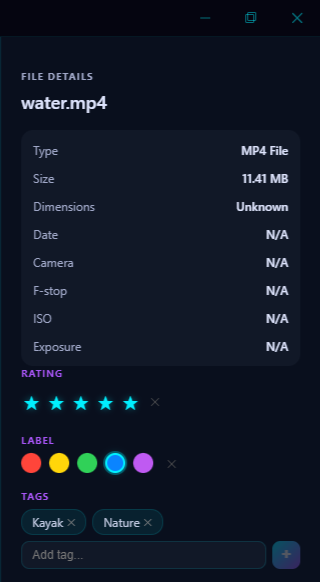
Tags, ratings, and color labels are the foundation of any good photo organization system. Pluto Photos gives you all three, and they're available even on the free tier.
Tags
Create any tag you want: there are no limits. Tags are freeform text labels you attach to photos. Use them for:
- People: "mom", "dad", "sarah"
- Events: "birthday", "wedding", "vacation"
- Locations: "hawaii", "new york", "home"
- Projects: "portfolio", "print", "social media"
- Status: "edited", "needs review", "shared"
Tags support autocomplete, so you can quickly reuse existing tags without typos.
Star Ratings
Rate photos from 1 to 5 stars. Use ratings to:
- Mark your best shots for portfolio curation
- Prioritize photos for editing
- Filter and sort by quality
- Build smart albums (e.g., "4+ stars from 2025")
Color Labels
Seven color options: red, orange, yellow, green, blue, purple, and gray. Common workflows:
- Red: Needs editing
- Yellow: In progress
- Green: Ready to share/print
- Blue: Personal favorite
- Purple: Client work
Search and Filter
All tags, ratings, and color labels are fully searchable. Combine them in the filter bar:
- Tag "vacation" + Rating ≥ 3 stars
- Color label Green + Date 2025
- Tag "family" + Tag "outdoors"
Works with Smart Albums
Tags and ratings feed directly into Smart Albums. Create a smart album with the rule "Tag contains 'portfolio' AND rating ≥ 4" and it automatically collects your best work.
Free Tier Included
Tags, ratings, and color labels are available on the free tier. No purchase required. Start organizing right away.
Try Tags & Ratings in Pluto Photos
Download free for Windows, macOS, or Linux. This feature is included in the free tier.