
Google Takeout Organizer
A Google Takeout export is a correct, complete copy of your Google Photos library and also, on its own, a genuinely unpleasant thing to organize: thousands of files, JSON sidecars, and timestamps that are often wrong. Pluto Photos' importer exists specifically for this.
The Problem With a Raw Takeout Export
Google Takeout gives you every photo and video, plus a .json file next to each one carrying the metadata Google actually has for it, the real creation time, GPS coordinates, description, people tags. The photo files themselves usually do not carry that same information correctly in their own EXIF data; opening a Takeout photo directly in a normal file browser or a basic import tool often shows the wrong date, frequently the day you ran the export rather than the day you took the photo.
How the Takeout Importer Works
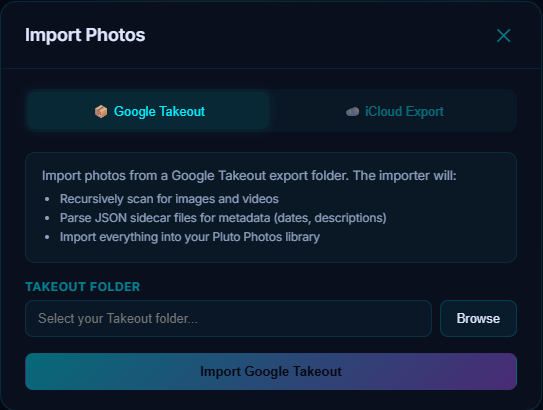
Cloud Import's Google Takeout tab recursively scans the folder you point it at for every photo and video, matches each one to its corresponding JSON sidecar, and pulls the real capture date and description from the JSON rather than trusting the file's own timestamp. Everything imports into a normal Pluto Photos library, same thumbnails, same search, same face detection as photos imported any other way.
What Are the Google Takeout JSON Files?
Each photo or video in a Takeout export is accompanied by a file like IMG_1234.jpg.supplemental-metadata.json (the exact naming has changed a few times as Google's export format evolved). It contains, among other fields, photoTakenTime, geoData and description: the data Google Photos actually stored about the photo, separate from whatever the file itself carries. This is exactly why Google Takeout dates are wrong if you skip the JSON and only look at the photo file.
After the Import
Once imported, the export stops being a pile of numbered folders and becomes a real library: searchable by AI description, face-grouped, sortable by the real date, and mapped by GPS where it exists. The duplicate finder is worth running afterward too. Takeout exports commonly include the same photo more than once if it was ever shared to multiple albums.
Frequently Asked Questions
Do I need to unzip my Takeout export first?
Yes: extract the downloaded archive(s) to a folder before pointing Pluto Photos' importer at it.
What if some photos are missing their JSON file?
They import using whatever date is in the file's own metadata as a fallback, rather than being skipped.
Does this work for Google Takeout videos too?
Yes, videos are recursively found and imported the same way as photos.
Will this fix the dates on photos I already imported the wrong way?
The importer needs to see the original Takeout folder with its JSON files to fix dates, if you already imported photos without the JSON present, re-running the import against the original Takeout export is the way to correct them.
Try it before you decide
Free up to 500 photos, no account needed. Windows, macOS and Linux. Pro is $29, once.