
How to Export a Photo for Print (CMYK, PDF/X-1a, Bleed and Soft Proof)
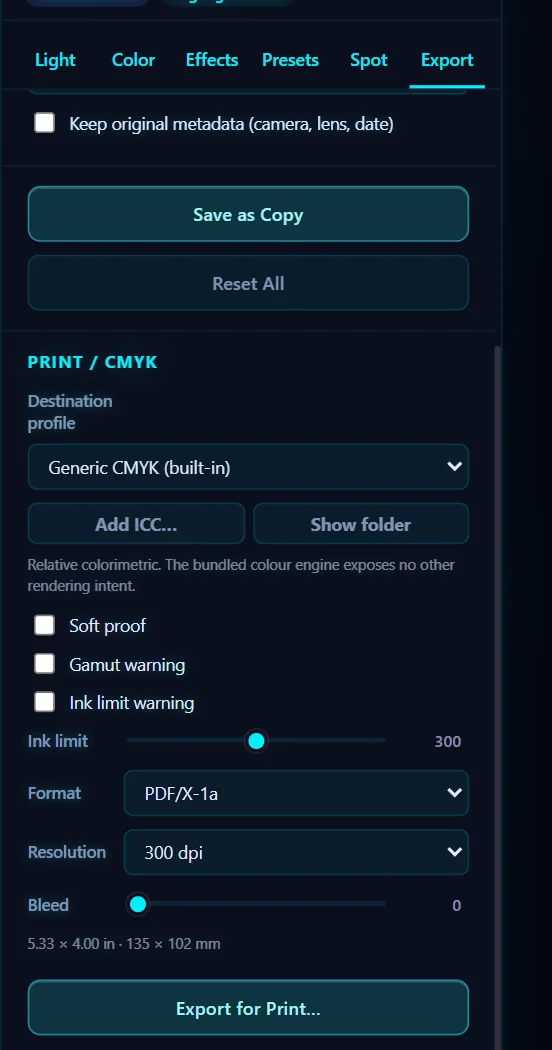
In the Export tab, scroll to Print / CMYK. Choose a destination profile, tick Soft proof and the warnings, pick PDF/X-1a, CMYK TIFF, CMYK JPEG or Separations, set Resolution and Bleed, and click Export for Print….
Requires Pluto Photos Pro (one-time $29, no subscription). The free download includes a 30-day trial of every Pro feature.
#1. Open the Export tab and find Print / CMYK
Click Export and scroll to Print / CMYK. Your screen shows RGB, but most commercial printers want CMYK, so this section converts the photo for them.
#2. Choose a destination profile
Destination profile defaults to Generic CMYK (built-in). If your printer gave you an ICC profile, click Add ICC… to load it. Show folder opens the folder where profiles are stored. The rendering intent is relative colorimetric.
#3. Soft proof and check warnings
Tick Soft proof to preview how the colors will look in the print profile. Gamut warning marks colors the printer can't reproduce, and Ink limit warning marks areas with too much ink. The Ink limit slider runs from 200% to 400%.
#4. Pick the format, resolution and bleed
Format offers PDF/X-1a, CMYK TIFF, CMYK JPEG and Separations (one TIFF per plate). Resolution is 150, 200, 300 or 400 dpi, and 300 is the usual print standard. Bleed adds extra image around the edge (0 to 10) so trimming doesn't leave a white edge. The panel shows the resulting size in inches and millimeters.
#5. Click Export for Print…
Click Export for Print… and choose where to save. Send the file to your printer. If you're not sure which profile and format they want, ask them.
#Tips
- Ask your printer first, because different printers want different profiles and formats.
- Check the resolution. A photo that is too small for the print size looks soft. A 300 dpi 8×10″ print needs 2400×3000 pixels.
- Use the Spot tab for named inks such as varnish, white and die lines.
#Questions
- Can Pluto Photos export CMYK?
- Yes. The Export tab has a Print / CMYK section with PDF/X-1a, CMYK TIFF, CMYK JPEG and separations.
- What resolution should I use for print?
- 300 dpi is the usual standard. Choose 150 to 400 dpi in the Resolution menu.
- What is bleed?
- Bleed is extra image beyond the trim edge so that cutting doesn't leave a white border.
About the photo editor · Pricing · Download Pluto Photos · Contact support