
How to Hide Private Photos in the Pluto Photos Vault
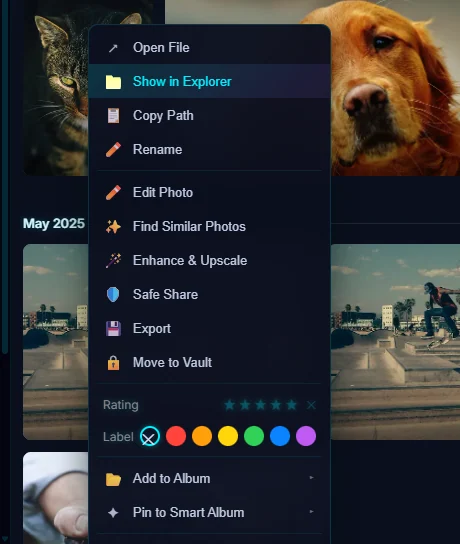
Right-click a photo and choose Move to Vault. It disappears from the main gallery. Open the vault from Protect, then Vault, and set a PIN of at least four digits with the key button.
Requires Pluto Photos Pro (one-time $29, no subscription). The free download includes a 30-day trial of every Pro feature.
#1. Right-click a photo and choose Move to Vault
Right-click the photo in the gallery. The menu includes Move to Vault, along with Open File, Show in Explorer, Rename, Edit Photo, Find Similar Photos, Safe Share, Export, Rating, Label, Add to Album and Pin to Smart Album.
#2. Open the Vault
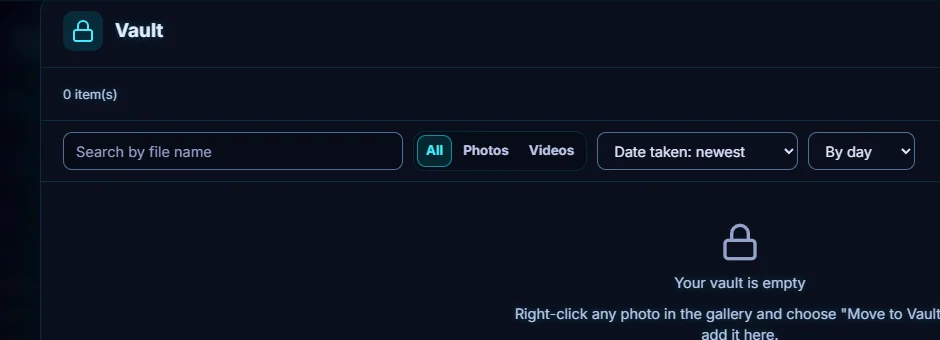
Open the Protect menu and choose Vault. The contents of the vault are hidden from your main gallery, and this is the only place they show. A new vault is empty and says so, with a reminder of the right-click method.
#3. Add more photos from inside the vault
Click Add photos at the top right to choose photos from your library. Inside, you can search by file name, filter to All, Photos or Videos, sort (for example by Date taken or Added to Vault), and group By day, By month or By year.
#4. Protect it with a PIN
Until you set one, the vault says No PIN set - vault is unprotected. Use the key button in the vault header to Set PIN (at least four digits). After that, the vault asks for the PIN to Unlock. A wrong PIN shows Incorrect PIN, and too many attempts locks you out for a short time. Change PIN and Remove PIN are in the same place.
#5. Take photos back out
Select photos inside the vault and choose Remove from Vault to return them to the main gallery, or Export a copy... to save a copy of them somewhere else. Deleting from the vault moves them to Recently Deleted for 30 days.
#Tips
- Set the PIN straight away. Without one, anybody who opens the app can open the vault.
- Use the Lock button when you step away.
- If you're posting a photo online, remove its location first.
#Questions
- Are vault photos hidden from the main gallery?
- Yes. Vault contents are hidden from your main gallery and appear only inside the Vault.
- How long does the PIN have to be?
- At least four digits.
About the photo organizer · Pricing · Download Pluto Photos · Contact support