
How to Watermark Your Photos with a Logo or Name
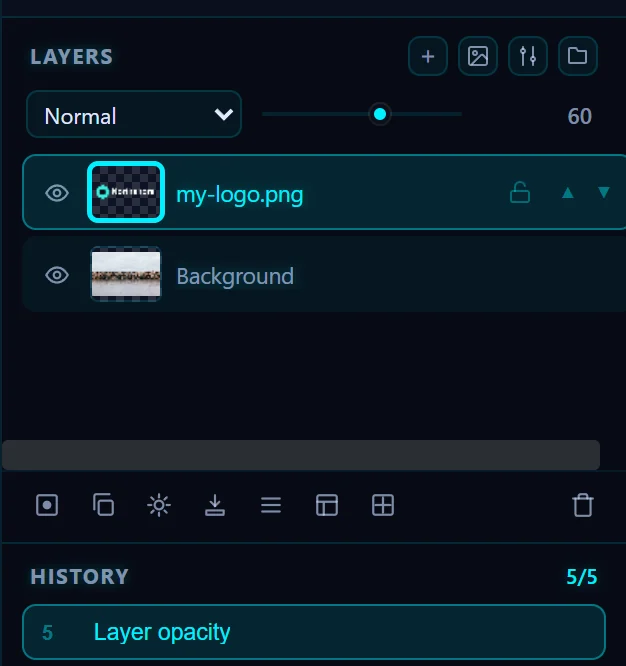
Choose File > Place Image… and pick your logo PNG. Shrink it with the corner handle, drag it into a corner and lower the layer opacity in the Layers panel to about 60%. Then Save as Copy.
Requires Pluto Photos Pro (one-time $29, no subscription). The free download includes a 30-day trial of every Pro feature.
#1. Open the photo
Open the photo you want to brand. A transparent PNG of your logo works best, because a JPEG logo brings its background with it.

#2. Place the logo and move it into a corner
Choose File > Place Image… and pick your logo. Drag the corner handle to shrink it to about a quarter of the width, then drag it into the lower right corner, leaving a margin from the edge.

#3. Lower the opacity
In the Layers panel, with the logo layer selected, drag the opacity slider (next to the blend mode menu) to around 60. The mark stays visible without taking over the photo.
#4. Save a copy
Click Save as Copy. Your original photo stays clean. If you want to reuse the same logo layer on other photos, save a project.

#Tips
- A watermark puts off casual reuse. It won't stop someone who is determined to copy the photo. A mark across the middle is harder to crop out than one in a corner, but it spoils the picture.
- The video editor has a watermark overlay too, with a position grid and a tile option.
#Questions
- How do I put my logo on a photo?
- Use File > Place Image… to add the logo as a layer, move it into a corner and lower its opacity.
- Can I watermark many photos at once?
- The editor works on one photo at a time. Save a project with the logo layer and reuse it, or place the logo in each photo.
About the photo editor · Pricing · Download Pluto Photos · Contact support