
How to Remove Location Data (GPS and EXIF) from a Photo Before Posting
Open the photo in the editor and click Save as Copy with Keep original metadata unticked, which is the default. The copy has no camera, date or GPS data. Your original file is not changed.
Requires Pluto Photos Pro (one-time $29, no subscription). The free download includes a 30-day trial of every Pro feature.
#1. Know what a photo carries
A photo taken on a phone carries hidden data called EXIF: the camera model, the date and time, and often the GPS position where it was taken. The library's File Details panel shows some of it, such as the date and the camera.
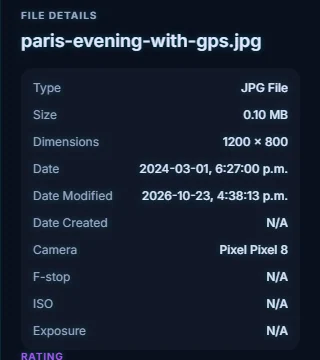
#2. Open the photo and check the Export tab
Select the photo and click Edit Photo, then open the Export tab. Keep original metadata (camera, lens, date) is unticked by default. Leave it that way.
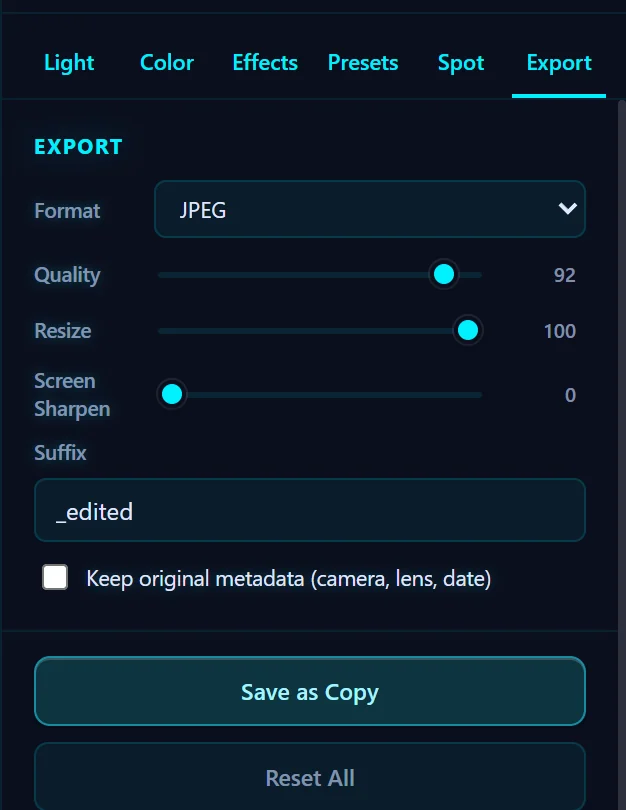
#3. Click Save as Copy
Click Save as Copy. The new file, named with the suffix (_edited by default), is written next to the original. We tried it on a test photo that carried a camera model, a date and a GPS position, and the saved copy had no EXIF block at all. The original isn't touched.
#4. Post the copy, not the original
Upload the _edited file. Some platforms strip location data and others don't, and a photo sent by email or in a chat usually keeps it. Removing it yourself is the safe choice.
#Tips
- A street sign or a house number in the background can give away where you are as well as GPS can. See how to hide faces, plates and addresses.
- Videos can carry location data too. The video editor renders a new file when you save an edit.
- The date and camera are removed as well, so a copy doesn't say when or with what the photo was taken.
#Questions
- How do I remove GPS data from a photo?
- Open it in the Pluto Photos editor and Save as Copy with Keep original metadata unticked. The copy has no GPS data.
- Does it change my original photo?
- No. Save as Copy writes a new file and leaves the original as it was.
- Is it done offline?
- Yes. The photo is processed on your computer and nothing is uploaded.
About the photo editor · Pricing · Download Pluto Photos · Contact support